
View RSS Feed

IB Adrian's vBulletin Blog

vBulletin 4.0.4 Style Generator

Rating: 24 votes, 4.71 average.
One of the features that has been requested heavily for vBulletin has been a way in which to make the creation of customer styles much easier.
In 4.0.4 (to be released soon - currently being QA'd), we have such a feature, called the Style Generator.
The feature will enable you to build a custom style for your site in under a minute.

Here is a quick walk-through by Andrew Elkins of how to use the Style Generator feature that will be included in 4.0.4:
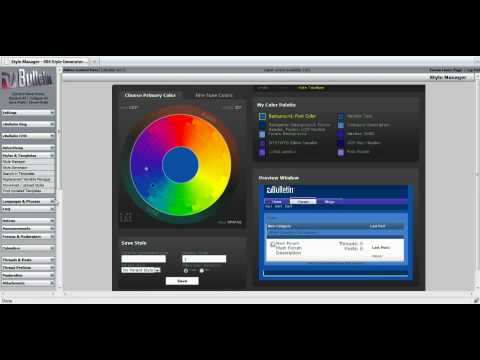

Text of the vide with time markers.
0:00 - vBulletin Logo
0:05 - Hi, This is Andrew Elkins of the vBulletin Team and I'm going to show you the Style Generator that will be 4.0.4.
0:13 - First, login to the admincp
0:20 - And on the left side, under "Style & Templates", choose "Style Generator".
0:25 - Here's the new style generator. One option to configure the color is to click and drag. Drag the primary color and I'll set it to orange and there's the secondary color which I will click and drag. I'll set that to yellow, for now.
0:38 - If you want to input the number directly, I can do so by clicking "Hue" for the primary color. Set that to "0" for red. And then I'll click "Angle" for the secondary color. It's the angle between the primary and secondary color. I'll set that to 45.
0:53 - And you can also choose a hex code. Which I'll set to... Pink.
1:00 - You'll also notice that when I'm changing over here, it'll change the color in the preview and the palette.
1:05 - Then also in the palette, you get options to click and configure each individual color more finely tuned.
1:13 - If I click and drag, I'll make it even more pink.
1:19 - You also see four scheme options. You have "color", "white", "grey", and "dark".
1:21 - The white is a default style replacement. Instead of the standard blue it's the color that you choose.
1:31 - Grey is a mostly grey background.
1:32 - Dark is a mostly black background.
1:34 - I'll choose to save it.
1:35 - The options to save are similiar to the ones you would see when you import a new style.
1:42 - Set a title. I'll say, "Hot Pink".
1:46 - Display order, "20".
1:51 - Parent style, I'll leave that.
1:53 - And user selection, I'll choose yes.
1:57 - Click save.
1:59 - And done.
2:02 - And then click "Hot Pink" to see the style.
2:03 - And now you have a new style that is generated by the style generator in 4.0.4
2:13 - This is Andrew Elkins and I hope you have a good day!

Submit "vBulletin 4.0.4 Style Generator" to Digg Submit "vBulletin 4.0.4 Style Generator" to del.icio.us Submit "vBulletin 4.0.4 Style Generator" to StumbleUpon Submit "vBulletin 4.0.4 Style Generator" to Google

Updated Fri 21st May '10 at 7:38pm by Andrew Elkins

Categories
vBulletin

Comments

Page 1 of 7 1 2 3 ... LastLast
  1. odln018 -
    odln018's Avatar
    This is pretty darn slick, thanks Adrian!
  2. odln018 -
    odln018's Avatar
    Adrian - One other. When a new version comes out, will this break the custom styles you make?
  3. Anth -
    Anth's Avatar
    Looks very snazzy!
  4. IB Adrian -
    IB Adrian's Avatar
    Quote Originally Posted by odln018
    Adrian - One other. When a new version comes out, will this break the custom styles you make?
    No - it creates styles in addition, not over the top of existing styles.
  5. borbole -
    borbole's Avatar
    This will make a lot of people happy
  6. Elyk -
    Elyk's Avatar
    Wow, looks good. Now if only the customize profile feature is fixed with 4.0.4 I will be really happy.
  7. pod -
    pod's Avatar
    When doing this kind of videos, please consider adding subtitles. I'm sure there's a lot of your customers (like myself) that can more or less understand written English but have a hard time understanding the pronunciation.

    Other than that, the new style generator looks sweet!
  8. IBxAnders -
    IBxAnders's Avatar
    That looks really groovy guys, Andrew nice job.
  9. Garamond -
    Garamond's Avatar
    Very nice indeed! This is the best news in a long time on this site.
  10. cloferba -
    cloferba's Avatar
    why this system is only used to background color and nothing more else stylevars?

    pd:
    when the video was showing background colorīs changes, navbar color also changes :S ...im confused :S
  11. Andrew Elkins -
    Andrew Elkins's Avatar
    I've added a transcription of the video to the post.
  12. pod -
    pod's Avatar
    Thanks Andrew
  13. Andrew Elkins -
    Andrew Elkins's Avatar
    Quote Originally Posted by cloferba
    why this system is only used to background color and nothing more else stylevars?

    pd:
    when the video was showing background colorīs changes, navbar color also changes :S ...im confused :S
    It affects other elements of the style. The preview shows background, border color, and text color changes.

    When you change the primary color it also moves the secondary color the appropriate amount to keep the angle between the two the same.
  14. Andrew Elkins -
    Andrew Elkins's Avatar
    Quote Originally Posted by pod
    Thanks Andrew
    You're welcome.
  15. Dody -
    Dody's Avatar
    Well done Andrew
  16. IB Adrian -
    IB Adrian's Avatar
    Quote Originally Posted by cloferba
    why this system is only used to background color and nothing more else stylevars?

    pd:
    when the video was showing background colorīs changes, navbar color also changes :S ...im confused :S
    They are dependently independent (if that makes sense?)
    You can adjust them separately, but by default if you change the background color, it will change the navbar color, you can then adjust the navbar independently.
  17. hornstar6969 -
    hornstar6969's Avatar
    Thanks Adrian for the Video.
    ps. You should do all the videos from now on. It was good to finally hear a video from a development site in an Australian voice

    This feature looks awesome tho. I can't wait to play around with it. Looks like vb4.0.4 may be the first release that may actually be worthy of the Gold Status. Nice work guys.
  18. djbaxter -
    djbaxter's Avatar
    Awesome. Very nice addition.
  19. odln018 -
    odln018's Avatar
    Andrew - is this a foundation that's going to be built on? In other words, is this the beginning of a full style editor that's somewhat WYSIWYG, and we'll be able to control more more attributes of the style?

    BTW - Sorry for saying "Adrian", I obviously didn't hear your name very well.
  20. IB Adrian -
    IB Adrian's Avatar
    Quote Originally Posted by odln018
    Andrew - is this a foundation that's going to be built on? In other words, is this the beginning of a full style editor that's somewhat WYSIWYG, and we'll be able to control more more attributes of the style?
    I will loosely say "perhaps".
    While we would like to have such a feature - we don't have it in our short term product plans due to what we see as more pressing priorities.
    With vB4, a lot of the feedback has been a frustration with the styles, and we wanted to alleviate as much of that pain as possible with this.
    If the feedback on this feature is positive, we can prioritize the development of a more comprehensive style editor accordingly.
Page 1 of 7 1 2 3 ... LastLast

Trackbacks

Total Trackbacks 0
Trackback URL: