
View RSS Feed

sophie

4.0 Graphics Developers' Kit Guide

Rating: 22 votes, 4.45 average.


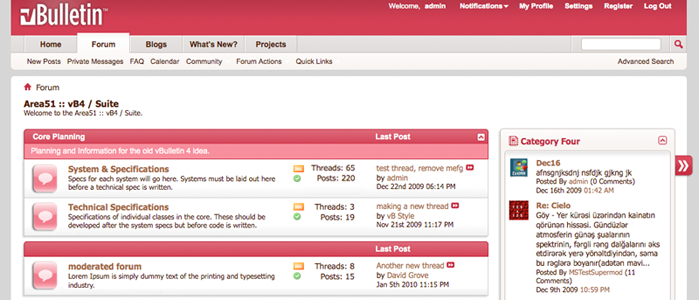
Editing vBulletin 4.0 default graphics to match your customized style with the 4.0 GDK is very simple. Here are a couple example cases of graphic customizations you can make on Adobe Photoshop (I'm using version CS4 here).

Single-layer monochromatic icons

This includes the single-color and single-layer icons found in /buttons, /site_icons, etc. A simple Color Overlay changes the colors of these icons. In Photoshop, double-click the layer that contains the icon to open the Layer Style window (or right click the layer >> Blending Options), then click Color Overlay and set it to the desired color.


Multi-layer graphics
Other graphics have multiple layers which you can edit separately in the Layer Style window. For the forum blocks tab (/misc/tab-collapsed.psd), I edited the Gradient Overlay and Stroke of the bottom layer and the Color Overlay of the top layer.


Status Icons
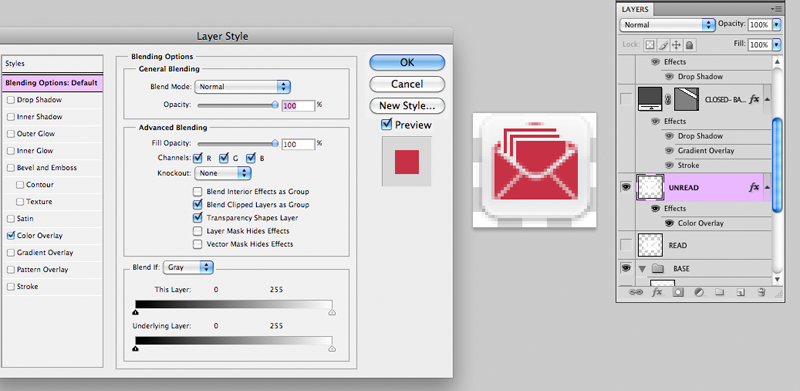
The Forum and Thread status icon master PSDs (/statusicon/thread-status-master.psd and /statusicon/forum-status-master.psd) are inclusive of all the layers which denote various statuses. For instance, thread-status-master.psd is composed of Deleted, Replied, Closed, and Moved layers, Read and Unread layers, and the Base layers. Here, I edited the Fill of the Base layer and the Color Overlay of the Unread layer to fit my style.


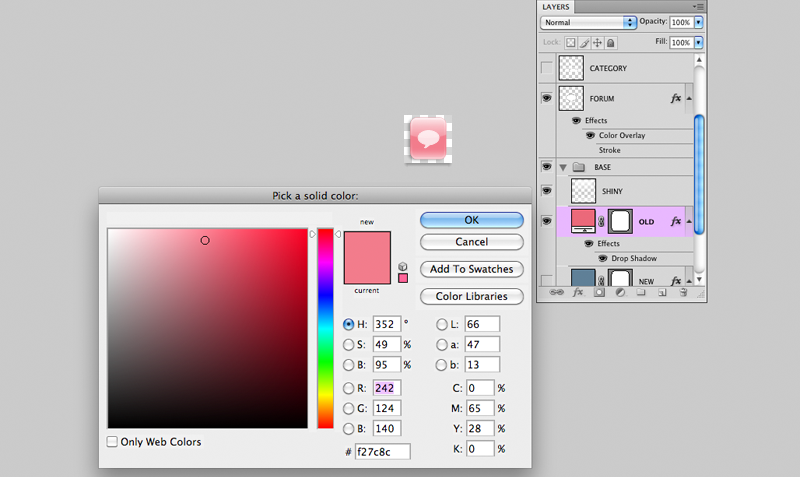
Similar changes to the base of forum status icon.


Of course, you can swap out the images directory files completely without using the GDK as frame of reference. However, keep in mind that changing the dimensions of the images can cause layout issues, so template edits will probably be a necessary accompaniment to image dimensional changes.

For inspiration, this thread has a great collection of custom skins. Happy modding!

Submit "4.0 Graphics Developers' Kit Guide" to Digg Submit "4.0 Graphics Developers' Kit Guide" to del.icio.us Submit "4.0 Graphics Developers' Kit Guide" to StumbleUpon Submit "4.0 Graphics Developers' Kit Guide" to Google

Updated Tue 12th Jan '10 at 4:12pm by sophie

Categories
Uncategorized

Comments

Page 1 of 3 1 2 3 LastLast
  1. CallieJo -
    CallieJo's Avatar
    Good stuff.

    Too bad I didn't have this kit when I edited all the graphics yesterday.
  2. Lynne -
    Lynne's Avatar
    Very nice, Sophie. Thanks!
  3. chloe -
    chloe's Avatar
    Thank you!!!
  4. BoYagoob -
    BoYagoob's Avatar
    Very useful. Thank you!
  5. Green Cat -
    Green Cat's Avatar
    Thanks.
  6. Ryan Ashbrook -
    Ryan Ashbrook's Avatar
    Awesome, thanks!
  7. PitchouneN64ngc -
    PitchouneN64ngc's Avatar
    Great! I need that to change colors of my postbit controls (grey on grey.... :/)

    Thank you
  8. Trombones13 -
    Trombones13's Avatar
    Very cool! Now, if only I had Photoshop...would such an easy edit be possible using GIMP?
  9. sophie -
    sophie's Avatar
    Yup, GIMP does support opening PSD files.
  10. Antes -
    Antes's Avatar
    Cute , Thank you guys
  11. Mr. Mikey -
    Mr. Mikey's Avatar
    FINALLY! thanks alot!
  12. Trombones13 -
    Trombones13's Avatar
    @sophie: I was thinking about how recoloring them would be in GIMP compared to using Photoshop. I might be missing a better option due to my lack of GIMP expertise, but I used the Colorify option for the buttons, and of course, it colors in the white portions as well. :/ Just curious if there'd be a way to edit the multi-layer objects as easily.
  13. Griffin80 -
    Griffin80's Avatar
    awesome thanks
  14. zonaenlinea -
    zonaenlinea's Avatar
    Thank you
  15. sophie -
    sophie's Avatar
    Trombones13- in GIMP, select the layer you want to edit and go to Edit >> Fill with FG Color (or BG Color or Pattern).
  16. choitz -
    choitz's Avatar
    It will save your sanity and though it may seem a little fiddily at first, you will quickly see how you can change whole directories very quickly (always) ensure you have bckups)!!
  17. cam2 -
    cam2's Avatar
    Thank you for this! Great tutorial.
  18. Micky_1 -
    Micky_1's Avatar
    Very nice, thanks
  19. Olahraga.com -
    Olahraga.com's Avatar
    yup... nice tutor
  20. Milado -
    Milado's Avatar
    I wish they were in one PSD file so we can change all the icons in one shot!
Page 1 of 3 1 2 3 LastLast

Trackbacks

Total Trackbacks 0
Trackback URL: