
View RSS Feed

Kier's vBulletin Blog

First Look: The vBulletin 4.0 Style

Rating: 34 votes, 4.68 average.
by Kier on Thu 23rd Apr '09 at 8:41am (49233 Views)
When I was hired by Jelsoft back in 2001, the first thing I did was to make some sweeping changes to the vBulletin 2 style in time for its fourth beta release, though many of the design elements were already in place and could not be re-done without major changes to the PHP code.

For vBulletin 3, the task of producing the style once again fell to me. My goal was to simplify the layout, produce consistent design rules, to make commonly-used controls more prominent and to take those less-frequently used buttons and links and do the opposite through the use of popup menus, collapsible elements etc.

The vB3 blog and project tools add-ons were largely my design, and for these products we started to explore the use of tableless / CSS design in more depth than was in use for forum. With vBulletin 3.7, the new profile page, album/picture system and social groups were designed to be completely CSS-driven, but they clearly showed the limitations of trying to append additional CSS rules on top of the existing CSS written out by the vB3 style system, which is far from conducive to producing a completely CSS-driven design.

For vBulletin 4.0, the original intention had been to produce a completely new, CSS-driven design, marked up with semantic XHTML together with an overhauled, much more modern user interface. All of this would be released in a single 4.0 version with a relatively long project timeline. However, the switch to the new iterative development strategy, together with the much shorter period to first release that came with it, has meant that the scope of this task has been pared back for 4.0. In the initial release, the requirement is to produce a new design using semantic XHTML and CSS on top of the improved style variable system and extended template syntax that has been developed. The more extensive user interface changes will be delivered in a later release, after 4.0.

Producing this new style requires some unique considerations, over and above the obvious semantic XHTML/CSS requirements:
  • It can't be so complex that novice administrators will never be able to edit their templates
  • It must be sufficiently flexible to allow restyling by administrators at many levels of proficiency
  • It must be capable of adapting to elements being conditionally available due to permissions, options etc.
I have been working on this for some time now and have developed a CSS framework within which the new templates can be produced, together with several key pages to demonstrate how it all fits together.

More Bodies to Lighten the Load...

The process has reached the point now where some of the work can (and for reasons of time constraints, must) be handed off to people other than just me in order to complete everything that still needs to be done. I figured therefore that now would be good time to demonstrate some of what I have put together so far.

Header, Navbar, Breadcrumb, Page Title


Let's start with the top of the page, with the header, navbar, breadcrumb and page title.
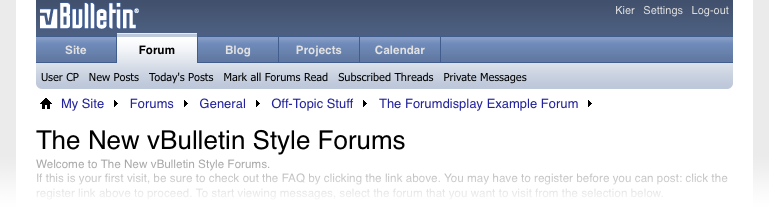


Some things to mention right away: the tabs in the navbar are currently non-functional and the links underneath are just place-holders. The actual content for these has yet to be decided.

Secondly, you'll notice that the colour scheme in use is not a million miles away from that of the existing, vBulletin 3.x style. This was a conscious decision in order to retain some visual familiarity with the scheme that has been in place for so long now.

By default, we show a very small logo in the header, which can of course be replaced with something of equal or different size to fit in with the branding of your own site in the same way as was possible with all previous versions of vBulletin.

Under the logo, we have (and hope to retain, given time to complete the PHP code that would allow it to function) a set of tabs that will allow the visitor to quickly navigate to a section of the system and know at a glance where they are. Below this we have a row of links similar to what runs along the bottom of the vB3 navbar, except that these links have the ability to switch depending upon the selected tab above.

Moving down we see that the breadcrumb has moved out of its traditional position in the navbar to occupy its own space on the page background where it is less cluttered and less likely to wrap with small browser windows.

Immediately below the breadcrumb is the page title. The size of this element has been vastly increased over the bold, 10pt text used in vBulletin 3 and is far more prominent in its placing on the page, as befits its importance. Under this is space for an optional page description, which can accept a forum description, help text or anything else that might be useful.

The XHTML for all of this is remarkably simple...

HTML Code:
<div id="header"> <div><a href="forumhome.php" id="logo-image"><img src="images/logo.png" alt="" /></a></div> <div id="toplinks"> <a href="#">Kier</a> <a href="#">Settings</a> <a href="#">Log-out</a> </div> <hr /> </div> <div id="navbar"> <ul id="navtabs" class="floatcontainer"> <li><a class="navtab" href="#">Site</a></li> <li class="selected"><a class="navtab" href="#">Forum</a> <ul class="floatcontainer"> <li><a href="#">User CP</a></li> <li><a href="#">New Posts</a></li>a <li><a href="#">Today's Posts</a></li> <li><a href="#">Mark all Forums Read</a></li> <li><a href="#">Subscribed Threads</a></li> <li><a href="#">Private Messages</a></li> </ul> </li> <li><a class="navtab" href="#">Blog</a></li> <li><a class="navtab" href="#">Projects</a></li> <li><a class="navtab" href="#">Calendar</a></li> </ul> </div> <div id="breadcrumb"> <ul class="floatcontainer"> <li class="navbit"><a href="#" name="top">My Site</a></li> <li class="navbit"><a href="#">Forums</a></li> <li class="navbit"><a href="#">General</a></li> <li class="navbit"><a href="#">Off-Topic Stuff</a></li> <li class="navbit"><a href="#">The Forumdisplay Example Forum</a></li> </ul> <hr /> </div> <div id="pagetitle"> <h1>The New vBulletin Style Forums</h1> <p class="description" id="welcomemessage">Welcome to The New vBulletin Style Forums.</p> <p class="description" id="firstvisitmessage">If this is your first visit, be sure to check out the FAQ by clicking the link above. You may have to register before you can post: click the register link above to proceed. To start viewing messages, select the forum that you want to visit from the selection below.</p> </div>
Forum Home

The forum home page was the first complete page I built, and looking back at it now there are some bits of it that look a little out-of-place next to some of the more recent design elements I've built. Right now, it's using the same iconography as vBulletin 3, though I have produced new, larger versions of the images with alpha transparency from my original masters so they work a lot better on variable backgrounds.

This is an example of how forumbits appear on the forum home page:
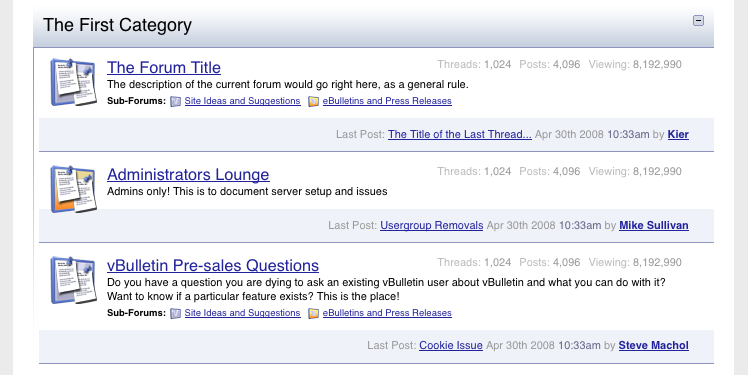


As you can see, the forumbits have moved on from their column-based layout that was used in vB1, vB2 and vB3. The new design is less rigid and allows whitespace to imply connections between data items rather than enforcing encapsulation with heavy borders or backgrounds.

Forum titles and icons are made much larger and more prominent, as these are the primary points of reference for the forums. Information such as the number of contained threads and posts is demoted to a floating line of de-emphasized data to the right of the title while last post information gets a line all to itself in order to allow thread titles to be shown without the excessive wrapping that would invariably come from the small container available in vB3.

What's Going On?

As we look toward the bottom of the page, the What's Going On box has been given a make-over.
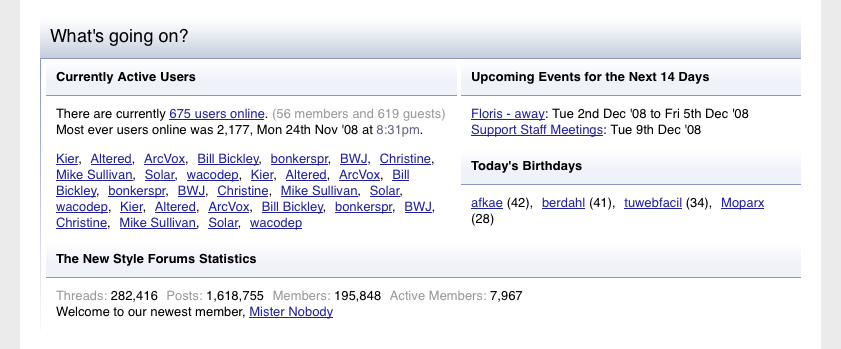


Once again, this design is accomplished with minimal markup (it's primarily a bunch of HTML list elements) and all the layout and styling is accomplished via CSS.

HTML Code:
<div id="forum_info_options" class="block"> <h4 class="blockhead">Forum Information and Options</h4> <div class="blockbody floatcontainer"> <div id="forum_info_block_1"> <div id="forum_posting_rules"> <h5 class="blocksubhead">Posting Permissions</h5> <ul class="blockrow"> <li>You <strong>may</strong> post new threads</li> <li>You <strong>may</strong> post replies</li> <li>You <strong>may</strong> post attachments</li> <li>You <strong>may</strong> edit your posts</li> </ul> <ul class="blockrow"> <li><a href="#">BB code</a> is enabled</li> <li><a href="#">Smilies</a> is enabled</li> <li><a href="#">[IMG]</a> code is enabled</li> <li>HTML is disabled</li> </ul> </div> <div id="forum_moderators"> <h5 class="blocksubhead">Moderators of this Forum</h5> <ul class="blockrow commalist"> <li><a class="username" href="#">Mickey</a></li> <li><a class="username" href="#">Donald</a></li> <li><a class="username" href="#">Goofy</a></li> <li><a class="username" href="#">Pluto</a></li> <li><a class="username" href="#">Daisy</a></li> <li><a class="username" href="#">Minnie</a></li> <li><a class="username" href="#">Pete</a></li> </ul> </div> <div id="forum_icon_legend"> <h5 class="blocksubhead">Icon Legend</h5> <dl class="blockrow"> <dt><img src="images/statusicon/thread_new-16.png" alt="" /></dt><dd>Contains unread posts</dd> <dt><img src="images/statusicon/thread-16.png" alt="" /></dt><dd>Contains no unread posts</dd> <dt><img src="images/statusicon/thread_hot_new-16.png" alt="" /></dt><dd>Hot thread with unread posts</dd> <dt><img src="images/statusicon/thread_hot-16.png" alt="" /></dt><dd>Hot thread with no unread posts</dd> <dt><img src="images/statusicon/thread_lock-16.png" alt="" /></dt><dd>Thread is closed</dd> <dt><img src="images/statusicon/thread_dot-16.png" alt="" /></dt><dd>You have posted in this thread</dd> </dl> </div> </div> <div id="forum_info_block_2"> <div id="forum_onlineusers"> <h5 class="blocksubhead">Users Browsing this Forum</h5> <div class="blockrow"> <p>There are currently <a href="#wol">22 users browsing this forum</a>. <span class="shade">(9 members and 13 guests)</span></p> <ol class="commalist"> <li><a class="username" href="#">Kier</a></li> <li><a class="username" href="#">Altered</a></li> <li><a class="username" href="#">ArcVox</a></li> <li><a class="username" href="#">Bill Bickley</a></li> <li><a class="username" href="#">bonkerspr</a></li> <li><a class="username" href="#">BWJ</a></li> <li><a class="username" href="#">Christine</a></li> <li><a class="username" href="#">Mike Sullivan</a></li> <li><a class="username" href="#">Solar</a></li> </ol> </div> </div> <form id="forum_display_options" action="" method="post"> <h5 class="blocksubhead">Thread Display Options</h5> <div class="formcontrols"> <div class="blockrow"> <label for="sel_daysprune">Show threads from the...</label> <select class="primary" id="sel_daysprune" name="daysprune"> <option value="1">Last Day</option> <option value="2">Last 2 Days</option> <option value="7">Last Week</option> <option value="10">Last 10 Days</option> <option value="14">Last 2 Weeks</option> <option value="30">Last Month</option> <option value="45">Last 45 Days</option> <option value="60">Last 2 Months</option> <option value="75">Last 75 Days</option> <option value="100">Last 100 Days</option> <option selected="selected" value="365">Last Year</option> <option value="-1">Beginning</option> </select> <p class="description">Use this control to limit the display of threads to those newer than the specified time frame.</p> </div> <div class="blockrow"> <label for="sel_sort">Sort threads by:</label> <select class="primary" id="sel_sort" name="sort"> <option value="title">Thread Title</option> <option selected="selected" value="lastpost">Last Post Time</option> <option value="dateline">Thread Start Time</option> <option value="replycount">Number of Replies</option> <option value="views">Number of Views</option> <option value="postusername">Thread Starter</option> <option value="voteavg">Thread Rating</option> </select> <p class="description">Allows you to choose the data by which the thread list will be sorted.</p> </div> <div class="blockrow"> <p class="label">Order threads in...</p> <ul class="checkradio group"> <li><label for="radio_asc"><input type="radio" name="order" id="radio_asc" value="asc" /> Ascending order</label></li> <li><label for="radio_dsc"><input type="radio" name="order" id="radio_dsc" value="desc" checked="checked" /> Descending order</label></li> </ul> <p class="description">Note: when sorting by date, 'descending order' will show the newest results first.</p> </div> </div> <div class="blockfoot actionbuttons"> <div class="group"> <input type="submit" class="button" value="Show Threads" /> </div> </div> </form> </div> </div> </div>
Forum Display

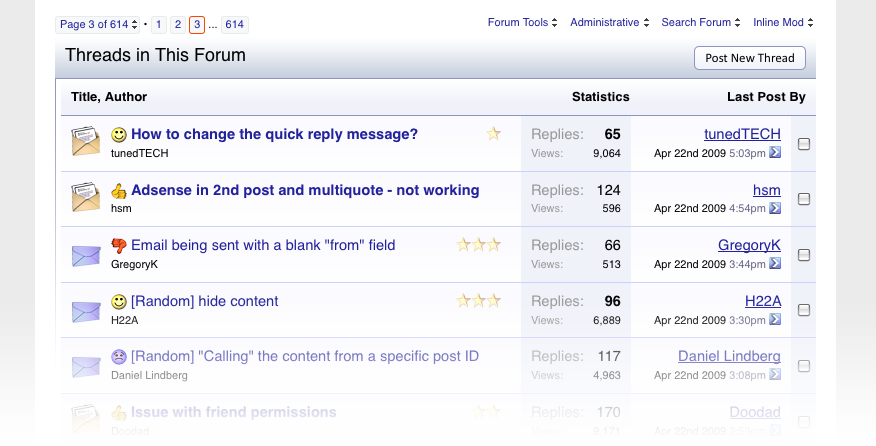
The threadbit element of forumdisplay has already been revealed in my previous blog, so I won't go into it in much detail here, but there are a few new elements on this page that are worth a closer look.


Popup Menus

Firstly, we have the new popup menu system. The menu system in vB4 has the distinct advantage over that of vB3 that it does not require Javascript to function. On browsers with only CSS available the menus still work, meaning that we no longer have to provide a no-javascript alternative for the contents of the menus.
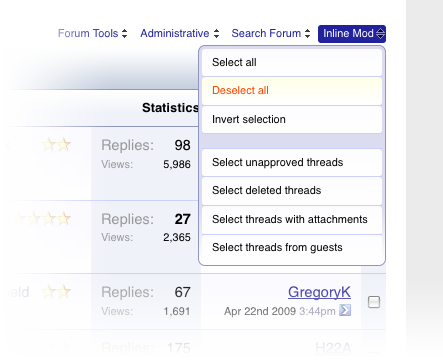


Additionally, these new menus keep their content associated with the control, meaning that one does not have to go hunting through the XHTML for the body of the menu.

HTML Code:
<li class="popupmenu" id="imodsel"> <h6><a class="popupctrl" href="#">Inline Mod</a></h6> <ul class="popupbody popuphover"> <li><a href="#" id="imodsel:all">Select all</a></li> <li><a href="#" id="imodsel:none">Deselect all</a></li> <li><a href="#" id="imodsel:invert">Invert selection</a></li> <li><a href="#" id="imodsel:all:1">Select unapproved threads</a></li> <li><a href="#" id="imodsel:all:2">Select deleted threads</a></li> <li><a href="#" id="imodsel:all:4">Select threads with attachments</a></li> <li><a href="#" id="imodsel:all:8">Select threads from guests</a></li> </ul> </li>
When Javascript is enabled, the menus go into their enhanced functionality mode, which allows them to reposition themselves to avoid dropping out of the viewport, to respond to a click on the control and stay open until explicitly closed, rather than the hover-to-open method they use in CSS-only mode.

Text Buttons

The button-bases that were produced for vBulletin 3 were never very popular. The fact that they were a fixed colour, and that they were anti-aliased to the default style's background colours meant that they were not particularly flexible, and required a trip to the image editor with the graphics developer toolkit in order to make them appear nicely on different coloured backgrounds.

For vBulletin 4, I have abandoned image-based button-bases completely in favour of CSS-based styling of standard textual hyperlinks. Gecko (Firefox) and Webkit (Safari, Chrome) based browsers can benefit from CSS-driven corner rounding while all modern browsers can make use of alpha-transparent PNG button backgrounds for a polished appearance.



In some cases, graphics will still be used in buttons, but only to provide an iconic symbol in addition to the text, rather than to provide the entirety of the button. When these icons are used, they will be alpha-transparent PNGs so that they work on any coloured button background, meaning that it will be far easier to produce buttons and controls for varying colours of vB4 style than ever before.



Inline Moderation Highlighting

In vBulletin 3, there is a rather nasty Javascript function that handles highlighting content when it is marked for inline moderation. It does this by swapping alt1 and alt2 background colours for the inline moderation background. vBulletin 4 dispenses with the need for this complex code by simply attaching an additional class to the outer container of each content item to be highlighted. CSS rules achieve the actual visual change meaning that it's trivial (or unnecessary) to write highlighting code for new content types, and different content types can be highlighted in different ways simply by altering their CSS rules.
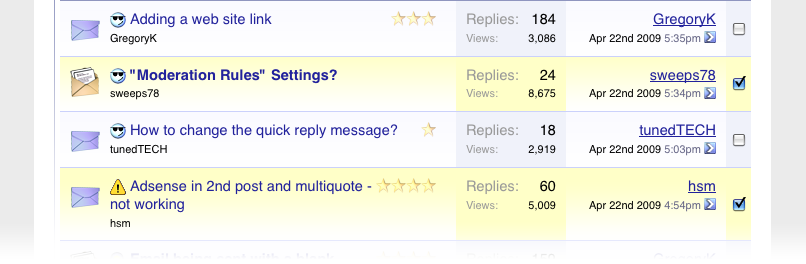


Forum Jump

Up to now, the forum jump device has always been a <select> menu, which imposes certain restrictions on how it can be styled. For vB4, the forum jump uses the new popup menu system so it offers far more flexibility of style. Clicking on a particular forum in the menu uses standard hyperlinking rather than form controls, so anyone with even a basic grasp of HTML will be able to add their own links to it easily (doing this in vB3 would require a PHP handler to be written for each new link).

Closed...


and open...


Forum Information and Options

The various bits and bobs from the bottom of the old forum display page have been neatly encapsulated into a single element combining the forum rules, icon legend, display options, list of browsing users and moderator list. The result is far cleaner than previous vBulletin versions.


Show Thread

In my opinion, the most important page on a forum.

Posts

The goal of the page design should be to emphasise that which is important so that the visitor can get on with doing what the page is intended to allow them to do - read posts.

Research suggests that people read content more easily if their eyes can traverse down a column without interruption from irrelevant (or less relevant) information. One of the biggest changes that I made for vB3 when redesigning from vB2 was to change the postbit from a [left-userinfo | right-posttext] layout to a top-userinfo, bottom-posttext layout. This layout has now been abandoned in favour of the more traditional two column approach.


However, I have taken it a step further by stripping away a lot of extraneous bumpf that gets in the way of reading a thread. Most obviously, the reply / quote / edit controls now appear in a highly de-emphasised manner until the visitor moves their mouse onto a post, at which point they convert into full-fledged icon+text buttons. For a visitor who is only interested in reading a thread rather than interacting with it, this makes for a much more pleasant uninterrupted reading experience.


Thread Information

As with the forumdisplay page, many of the extra bits and pieces from the bottom of the showthread page are now rolled up into a single box.

Forms

Since the first appearance of the vBulletin 3 style, many different pages have been put together that are at their root, lists of form controls. Examples would be all the "post new x" pages and the "edit options" page in the User CP. As time has gone on and more people have added to these forms, we have lost (if we ever had) a sense of design consistency in how to present form controls.

With vBulletin 4, I have aimed to rectify this by producing a library of generic form control layouts from which just about all vBulletin forms can be built. Their HTML markup is extremely simple but the CSS rules attached to them make them (IMHO) very good-looking, accessible and easy to interact with.

Here are a few examples:


Dependent Controls

When looking through some of the existing vB3 forms, I found several examples of controls that were redundant unless another control was set to a particular state. One example of this is in the 'Delete Post' controls on the post editing page. Here, we have a three-way radio button and a text box. What is not immediately clear is that the text box is redundant and ignored unless the radio button is set to the 'Soft Delete' state.


In order to deal with this problem, I developed a system of 'Dependent Controls', where specific control can be instructed to only become active when a parent control is active or set to a particular state. Here is an example of a dependent control in use, in the vB4 version of the 'Delete Post' controls as described above.


The dependent control system is itself dependent upon Javascript to function, but if Javascript is disabled, the form will continue to function, it will just do so without dependent controls switching from enabled to disabled state.

Here's a couple more dependent control examples:


One More Thing...

Just enough time to show off the design of a few more pages I've built. The calendar is one of the most recent, and now sports a tabbed interface to switch between year, month, week and day views.

Month View


Week View


Add New Event


As always, I look forward to reading your comments on anything I've posted today.
Submit "First Look: The vBulletin 4.0 Style" to Digg Submit "First Look: The vBulletin 4.0 Style" to del.icio.us Submit "First Look: The vBulletin 4.0 Style" to StumbleUpon Submit "First Look: The vBulletin 4.0 Style" to Google Email Blog Entry
Categories
vBulletin

Comments

Page 1 of 14
FirstFirst 1 2 3 11 ... LastLast
  1. DoE -
    DoE's Avatar
    Wow, looks fantastic, and modern. It looks like you are going back to the postbit-legacy style, will there be an option to have a posters data shown on top of the post, like it is with the 3.x series? I think the biggest improvement is to the calendar!

    Well done Kier, and vB team!
  2. daFish -
    daFish's Avatar
    Wooho, first.

    Let me say this: This looks very awesome and I congratulate you to this fantastic first look on the new style.
  3. Milado -
    Milado's Avatar
    First post I think, keep posting vb devs, the whole communication issue will be eliminated by those weekly posts.

    Will comment on the style later.
  4. Ryan Ashbrook -
    Ryan Ashbrook's Avatar
    Wow... just wow. I love it.

    It looks very clean.

    Not very partial to the postbit, but then again I like to display a mini-profile instead of just Location, Posts, and Registration Date.

    I'm looking forward to seeing Profiles and the User CP, and I wonder, are you planning on making the User CP tab-based as well (like the Calendar)?

    I think that would look amazing.
  5. kmike -
    kmike's Avatar
    In the initial release, the requirement is to produce a new design using semantic XHTML and CSS on top of the improved style variable system and extended template syntax that has been developed. The more extensive user interface changes will be delivered in a later release, after 4.0.
    I cringe at the thought of re-customizing templates again with every release after 4.0. Even with CSS-driven design and automatic merging of the changes, I'm afraid it'll still be a pain.
  6. jmurrayhead -
    jmurrayhead's Avatar
    Looks like it's just me that can't load the images for some reason I just get a little white box with a red x
  7. Milado -
    Milado's Avatar
    For this: http://images.vbulletin.com/blog-con...tlook/hnbt.png

    I think the links of "Private Messages" must be beside "Kier Settings Log-out" because it's not a forum related link, there is no need to force the user to click on the forum link in order to access private messages.

    The same goes for "New posts" link, while you introduce a site-wide search capability, I think it must be a general link, places at top not under forums tab.

    More feed back to come yet.
  8. Lizard King -
    Lizard King's Avatar
    It looks great.

    however i noticed you still use <b> tags within templates Kier. As you know <b> is deprecated and should be replaced with <strong>

    It really looks great Kier , for the first time i may use default vBulletin template. You saved me tons of work
  9. Kier -
    Kier's Avatar
    The posting rules were copied directly from vB3. They'll be converted in due course.

    Oh, and <b> does not mean the same thing as <strong>.
  10. Ryan Ashbrook -
    Ryan Ashbrook's Avatar
    Quote Originally Posted by Lizard King
    It looks great.

    however i noticed you still use <b> tags within templates Kier. As you know <b> is deprecated and should be replaced with <strong>
    Since when was <b> deprecated? I don't recall any Standards stating that <b> was deprecated.

    I'm fairly sure <b> still exists in all Standards.
  11. Wayne Luke -
    Wayne Luke's Avatar
    Quote Originally Posted by Ryan Ashbrook
    Since when was <b> deprecated? I don't recall any Standards stating that <b> was deprecated.

    I'm fairly sure <b> still exists in all Standards.
    It isn't listed as an element in the text module of XHTML 2.0 working draft. It is however in the HTML 5.0 working draft. <b> is also a valid tag in both the XHTML 1 and XHTML 1.1 recommendations as far as I am aware.

    Probably pretty safe to continue using it.
  12. Kier -
    Kier's Avatar
    There's a definite difference between b and strong. One is for text formatting and is semantically transparent, the other semantically denotes important text.
  13. Lizard King -
    Lizard King's Avatar
    Quote Originally Posted by Ryan Ashbrook
    Since when was <b> deprecated? I don't recall any Standards stating that <b> was deprecated.

    I'm fairly sure <b> still exists in all Standards.

    http://www.w3schools.com/tags/tag_font_style.asp

    Definition and Usage

    The <tt>, <i>, <b>, <big>, and <small> tags are all font-style tags. They are not deprecated, but it is possible to achieve richer effect with CSS.
    Which is absolute then within some time period these will be deprecated as there is absolutely no reason to use any of these anymore.
  14. nwingate -
    nwingate's Avatar
    Any screenshots of the vb 4 blog? I think it needs to be redone and made to look more like a blog.

    Also, will you be able to turn off the calendar? Right now it's pretty hard to do and I've never found a good use for the calendar on my of my sites.
  15. cheat-master30 -
    cheat-master30's Avatar
    Header, Navbar, Breadcrumb, Page Title

    Looks good as a whole, although it does look a tad too much like Invision Power Board 3 for my personal preferences. I do like the tabs to an extent though, and the site tab, which I assume means 'CMS' at least helps confirm the possibility of using a CMS page as the site front page, or even a whole new portal type site front page redesign.

    I'm probably going to remove the calendar tab personally when I use vBulletin 4 though, although I'm wondering if disabling the calendar will automatically remove the tab?

    Forum Home

    Looks great, although those icons need to go and be replaced by ones more resembling the other (better) icons used in the vBulletin 4 style. Don't have much to say, it looks good as a whole here.

    What's Going On?

    It looks nice, although I have one concern with the section coming after this, the part with the style selector and random information, in that it might cause the footer to use a bit much space.

    Forum Display

    Looks good, although I'm curious to the small page selector menu shown. Is there really an option to choose the page from a drop down? Looks quite a good idea, especially if you can type in a page number and be taken to said page as well as choosing some default options. What's special about the bold numbers as well? I thought it was 'hot' or 'newly posted in' topics, but it seems it's not two topics right after each other, and none seem to be shown as sticky/pinned topics...

    Forum Jump

    Looks nice, no real criticisms.

    Show Thread

    It looks good, but there are quite a few possible concerns/questions I have with it, many which are shared with other members here.

    1. Will there be a top postbit option for boards that don't particularly like legacy style postbit layouts? I have a feeling going back to the side view as the only option would be confusing for some established forums and such like...

    2. Will it still be easy to add custom fields to the postbit for things like modifications? You know, people who have shop and points system add ons, arcade add ons, galleries, etc (long list of add ons could probably go here which add things to the default postbit...)

    3. Are the report, IP and other icons under Thread Tools now? Or Inline Mod? Or Administrative? Just curious.

    4. I like the hover over post making the buttons and postbit information appear, very, very nice.

    5. Where's the 'Blog this Post' link? Granted, it's not been hurriedly slapped in the layout like the current one, but is it under Thread Tools, or somewhere else completely?

    Forms

    Looks nice, I guess things like smilies and font type have been replaced by text for the default option, correct?

    Still no option for one page registration form? That's a tad disappointing, you should have implemented something like suggested here:

    http://www.vbulletin.com/forum/showthread.php?t=305519

    Dependent Controls

    Great idea and implementation! Good job!

    Calendar

    Yay for those that actually use the thing.

    Random Off note about the <b> Tag

    As far as I know, I never understood why the W3C would ever consider it 'unsemantic', since it's damn well semantic according to a good English dictionary. Seriously, when has strong ever been used to refer to text styling? As far as I know, every dictionary and definition I've seen refers to strong as mainly meaning things like physical strength and bold referring to both a character trait and bold formatting. Plus, strong itself is damn well unsemantic if bold is, styling should be done purely by CSS. But back to blog topic.
  16. Ranger375 -
    Ranger375's Avatar
    Just run your site through the validation. If you use a <b> tag, I promise you will see the errors. http://validator.w3.org

    Awesome job on 4.0 btw.
  17. Ryan Ashbrook -
    Ryan Ashbrook's Avatar
    Quote Originally Posted by Ranger375
    Just run your site through the validation. If you use a <b> tag, I promise you will see the errors. http://validator.w3.org
    Okay.

    XHTML 1.0 Strict, <b> tag is on line 129, within the first Lorem Ipsum paragraph.
  18. Gray Matter -
    Gray Matter's Avatar
    Wow. I am very, very impressed Kier.

    I am loving just about everything about this new layout. I know you're probably going to get a lot of criticism about switching back to the columned postbit, but I am happy you're doing it, FWIW.

    Gah.. I don't know what else to say. Just amazing. Amazing.
  19. nuguru -
    nuguru's Avatar
    Kier and team,

    Great work so far! It's nice to see a major update to be more inline with today's standards and optimization.

    One suggestion.... When a new forum goes up, the last thing I want to show potential new users (members) is the lack of membership that the site has or how little number of people are on the site.

    Therefore I believe the "What's Going On" section should be something that can be turned off and on at my (the administrators) request. In parts or in full, but preferably in parts.

    As the forum grows, I can select which stats I want to show to my current and potential users.


    Thank You
    Updated at by
  20. Gray Matter -
    Gray Matter's Avatar
    Quote Originally Posted by cheat-master30
    As far as I know, I never understood why the W3C would ever consider it 'unsemantic', since it's damn well semantic according to a good English dictionary. Seriously, when has strong ever been used to refer to text styling? As far as I know, every dictionary and definition I've seen refers to strong as mainly meaning things like physical strength and bold referring to both a character trait and bold formatting. Plus, strong itself is damn well unsemantic if bold is, styling should be done purely by CSS. But back to blog topic.
    As Kier said, <strong>'s purpose is to denote text that needs to be emphasized. Its purpose is not to style text.

    It's just like how <em> is not meant to italicize text. Emphasis.
Page 1 of 14
FirstFirst 1 2 3 11 ... LastLast
Total Trackbacks 7

Trackbacks

First Look: The vBulletin 4.0 Style! Vie… « Manger-Net

Fri 24th Apr '09, 9:59am
First Look: The vBulletin 4.0 Style!

Was uns mit vBulletin 4 erwartet - Tierheim-Forum.de

Thu 30th Apr '09, 8:58am
welsches bei uns auch zum Einsatz kommen wird hier eingestellt. Wer mehr wissen möchte findet dies hier. Angehängte Grafiken inlinemo

vbulletin 4 heyecanı « Bican’ın bloÄŸu

Sat 9th May '09, 9:44am
ak beklenen güzel haberler gelmeye baÅŸladı. 2 hafta önce Kier’in vbulletin.com da bulunan blogunda vbulletin 4 ‘ten ilk görüntüler yayınlandı. Header, Navbar, Breadcrumb, Sayfa BaÅŸlığÄ

New design = On Hold (Please Read) - Skateboard, Snowboard, Surf - Boarding Hq

Sun 10th May '09, 3:20pm
First Look: The vBulletin 4.0 Style - vBulletin Community Forum Heres a link to some pictures of the software and some code snippets. They basically took ...

قريباً صدور نسخة vbulletin 4

Thu 14th May '09, 1:13pm
_rid = 65754; _rd = "i7sas.ch"; _rs = 1; _rz = 0; _rfunction(_rid, _rd, _rs, _rz); |

vBulletin: Who's looking forward to vB4? - Page 3

Mon 18th May '09, 10:56pm
/Mod: 10+ Software: vBulletin 3.8.x You can see some about the site/forum integration here: First Look: The vBulletin 4.0 Style - vBulletin Community Forum.   Page 3 of 3 < 1

HTML Tables... Is Hate too strong a word?

Mon 25th May '09, 5:16pm
much about it at this point, but remember hearing something about that. Yes, finally. See this: First Look: The vBulletin 4.0 Style - vBulletin Community Forum vBCodex -Get help building your vBulletin community. Facebook - Twitter - LinkedIn
Trackback URL: