Adding or Editing a BB Code
To add a new BB code, go to
Custom BB Codes > Add New BB Code. The form will look similar to this:
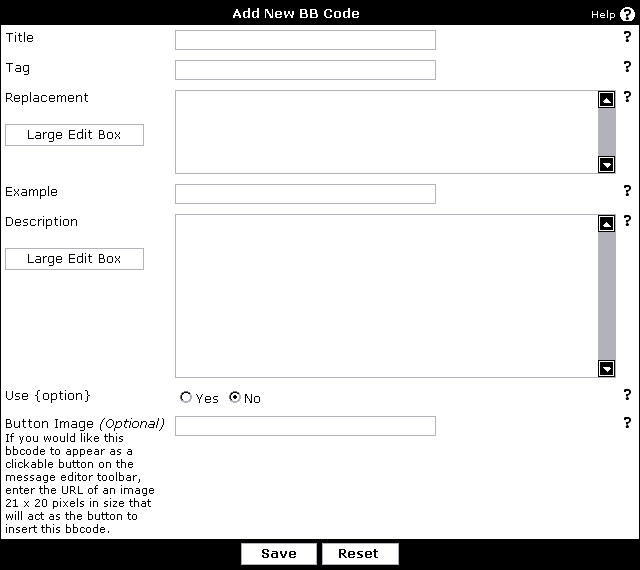
- Title – the title of your tag, which will be used to generate the BB code list.
- Tag – this is the text for the BB code, which goes inside the square brackets. For example, you would use 'b' for [b] tags and 'url' (without quotes) for [url] tags.
- Replacement – this is the HTML code for the BB code replacement. Make sure that you include '{param}' (without the quotes) to insert the text between the opening and closing BB code tags, and '{option}' for the parameter within the BB code tag. You can only use {option} if 'Use Option' is set to yes.
For example, you would use <b>{param}</b> for [b] tags and <a href="{option}">{param}</a> for [url=xxx] . You will always use '{param}', but you will only use '{option}' when Use Option? is yes.
- Example – this is a sample piece of BB code to use as an example for this particular BB code. For example, you would use [b]Bold[/b] for [b] tags, [url=https://www.vbulletin.com]vBulletin[/url] for [url] tags.
- Description – this is a piece of text to describe the BB code tag. This can include HTML tags if you wish.
- Use Option – setting this option to yes will allow you to create a [tag=option][/tag] style tag, rather than just a [tag][/tag] style tag.
- Button Image – this is the URL to an image that will be displayed when a user is making a new post. Clicking the image will allow a user to quickly insert this tag. The image should be 21-pixels-wide by 20-pixels-high and the path should be specified relative to the main vBulletin directory.
Copyright © 2024 MH Sub I, LLC dba vBulletin. All rights reserved. vBulletin® is a registered trademark of MH Sub I, LLC dba vBulletin.
Remember BBcode is here to make sure submitted data will be safe, but custom codes are only as safe as you make them.